
Review of Microsoft Windows XP Professional
Version 2
The Past
Here I am in front of my good ol' computer, comprising of a Pentium II 300, 256MB RAM, 20GB IBM Hard Disk, ASUS P2B, Sound Blaster AWE64, Realtek RS8029 NIC and a 3dfx Voodoo3 3000. Oh, and a 32X Sony CD-ROM. Do I need to mention the floppy drive and other necessities?
The Starting Point . . .
Even with it's system requirements of a Pentium II 233, 128MB RAM, 1.5GB Space plus the necessities such as the CD-ROM and sound card, Windows XP stood out among the rest in some cases, and a disappointment in other cases.
When I first got Windows XP, I was intending to install it in my hard disk which already has Windows ME. After going through backups and deleting windows, I discovered that running the SETUP.EXE in the Windows XP CD gave a shocking message "This program cannot be run in DOS Mode".
As I didn't have access to the web, I installed Windows Millennium Edition back and installed XP (using the New Installation option and my current drive) over it, hoping it has the intelligence to remove Win ME completely. To my horror, Win XP Setup created a Windows.0 folder (even though I specified C:\WINDOWS) and installed the files to it! There were some information online as I discovered later, which enabled me to install a new copy, thanks to Google.
First, the Setup program. I did a clean install, if you want to know how I did that, you can check here - Installing Windows XP From DOS. Windows XP didn't allow me to customise which accessories to install. Rather, it installed all the things I'll never use. Windows Movie Maker, Windows Messenger, MSN Explorer and Remote Assistance (not that I will need it, hehe).
The Setup program went smoothly, restarting my computer about 3 times. At some points, it will request Regional Data (like time, data format) and network information, instead of asking all these in the beginning. This requires you to peep at the monitor every once in a while during setup.
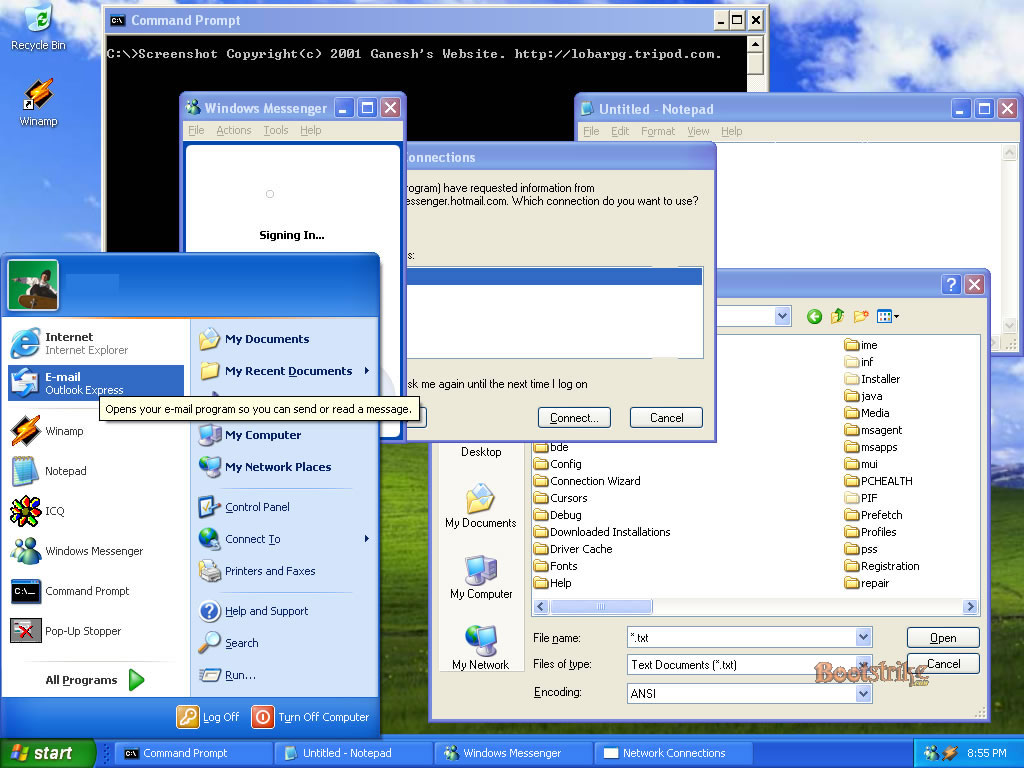
After installation, Windows XP started up with the beautiful Luna interface. Here is the full blown Windows XP screen shot with the new interface enabled (this is taken weeks after the installation):
 What
this Windows XP Interface Screen Shot has:
What
this Windows XP Interface Screen Shot has:
- New interface, icons and start menu.
- Notepad, Windows Messenger, Command Prompt and the Notepad Open Dialogue window
- Behind Windows messenger, you see the Network Connections window. Since I have 4 ISPs (yep, four), and Windows Messenger is attempting to connect to the server, this window allows you to choose your connection. Same as Windows ME dial-up window.
- Mouse pointers can have shadows and many other visual enhancements that can be disabled to speed up your PC.
View the screen shot in its actual size in 1024 x 768(158 KB), for privacy reasons, the name beside the icon in the start menu is not shown.
The first thing that you will notice upon booting Windows XP is the XP version of the bootup screen. It's cooler, with a black background and the words "Microsoft Windows XP" with a small blue bar. Bootup speed was faster than the SP1 version.
Upon launching the GUI, the desktop was sky blue with the word Welcome. Seconds later, I am in my desktop. I was requested to enable Windows Update and my Firewall for the Internet Connection which I promptly did.
 Windows
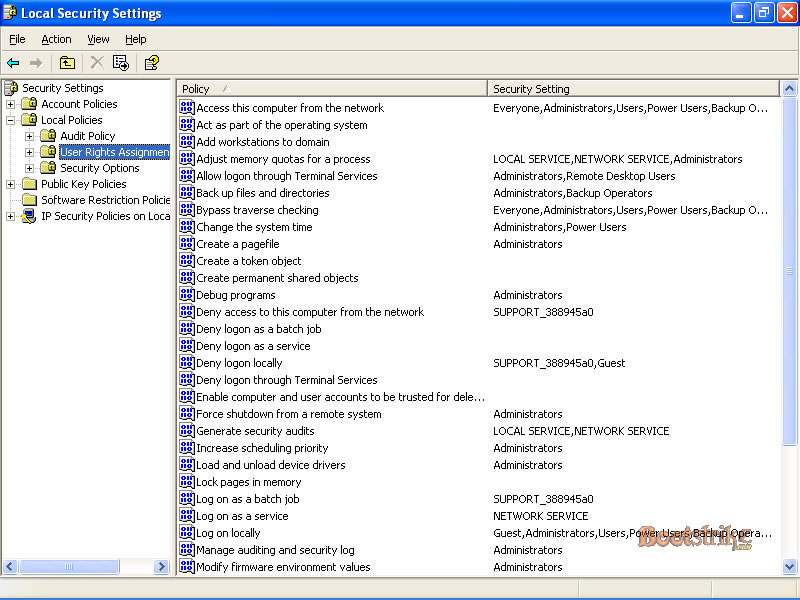
XP's key advantage is the management of multiple users. An administrator,
that is, the person who has full access to the computer can create accounts
and set certain rights to it.
Windows
XP's key advantage is the management of multiple users. An administrator,
that is, the person who has full access to the computer can create accounts
and set certain rights to it.
Similar to Windows 2000 network management, but in this case, it is your computer that is the network. A user with a account can customize his Start Menu, Desktop icons and has his own folders for Cookie storage,
Temporary Internet Files, Temporary Files, Favourites, History and even his own Outlook Express messages storage area. Users can set files to be non-viewable by other users (I'm not sure whether Administrators can access private files).
Users can also be granted rights, in Local Security Options. Here, you can set password minimum and maximum age, password length, complexity requirements, password encryption, the ability to shut down the system, set a message text for users attempting to log on and much much more.
If you have multiple users, the welcome screen will show the user image and their user id. A person just has to click on the id, enter his/her password and his personal desktop can be accessed.
Windows XP comes with built-in ZIP file compression support. Clicking a folder in Explorer will expand to include zip files as folders. Clicking one of the "folders", you can view, add and extract files from the archive.
Features that bring it to the front
System Restore, now, that is a good feature many people would like to use. Microsoft's definition: "In the event of a system problem, you can restore your computer to a previous state without losing your personal data files (such as documents, Internet favourites, and your e-mail). System Restore monitors changes to your computer, and periodically makes easily identifiable restore points.
These restore points allow you to revert your system back to a previous state. You can also create and name your own restore points at any time." I didn't use this, as I think reverting a system back to a previous points may undo system changes I intentionally did.
For LCD monitors, XP comes with what is calls ClearTypeTM technology. It improves font resolution for those users. However, to use this utility with CRT monitors, a special utility download from Microsoft is needed. When I enabled this for my CRT monitor, all text appeared slightly blurry, enough to hurt my eyes.
With the ClearType Tuner Powertoy, I was able to achieve smoothness in my CRT. Fonts appeared much more smoother. Keep in mind that this only affects text, and will not enhance quality of images or other non-textual stuff. But it will sure make your Internet browsing experience better.
Windows XP also allows anyone (with your permission) to remote control your PC, similar to pcAnywhere by Symantec. This is great if you need to friend to give you technical support.
It allows you to set whether he can control your mouse and/or keyboard. I managed to do this once with Windows Messenger with my friend who also uses XP. Unfortunately it does not work with people who don't have Windows XP (even if they have MSN Messenger installed).
If you're a Internet Explorer fan, you'll be pleased to know it comes with version 6, the current latest version. With the new pop-up blocking and Add-On manager that comes with SP2, spyware detection and pop-up window controlling is much easier. With Firefox gaining the upper hand, Microsoft will be catching up soon with its Internet Explorer 7.
 The
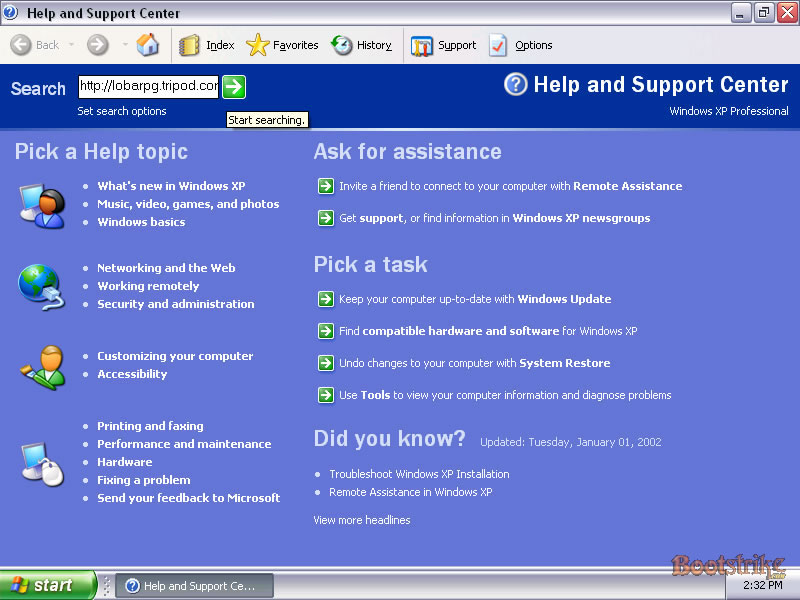
help system in Windows XP includes much more information that the previous
Win9x's OS's. Information on partitioning, FAT32, NTFS, defragging and
other stuff can be found.
The
help system in Windows XP includes much more information that the previous
Win9x's OS's. Information on partitioning, FAT32, NTFS, defragging and
other stuff can be found.
Speaking of NTFS, Windows XP supports NTFS and it is highly recommended you upgrade to NTFS unless you have set up dual OS's. Windows NT and 2000 only support NTFS.
If you convert your drive to a NTFS, it will not be accessible by unsupported OS's. NTFS offers compression on selected folders and/or files and more free disk space as the minimum cluster size is only 0.5kb, while FAT32 is 4kb. Also, you will not be able to access your NTFS drive if you boot from a Windows ME boot disk (or DOS, Win95 disks) without using special drivers.
If you have a CD Writer, you'll be glad to know that Windows XP supports CD writing within the OS itself. It is in some ways restricted, such as not being able to verify the data written. Don't hope for it to be as full blown as Nero. First you have to select files to write, right-click, and Send To CD for writing. Finally, issue the command to start writing the CD by right-clicking the CD Drive and Write the files.
 Finally
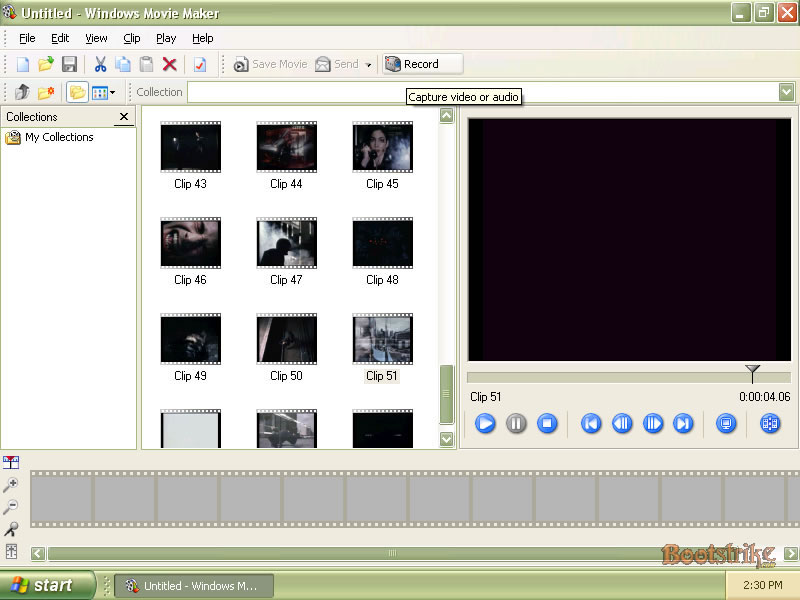
Windows XP comes with all the usual accessories, Windows Movie Maker,
Narrator (only includes a Male Voice called Microsoft Sam that reads out
text at the mouse pointer), Windows Media Player 9,
Finally
Windows XP comes with all the usual accessories, Windows Movie Maker,
Narrator (only includes a Male Voice called Microsoft Sam that reads out
text at the mouse pointer), Windows Media Player 9,
Fax support(useful add-on to send and receive faxes for folks to receive faxes using their PC temporarily - requires phone modem), Internet Connection Sharing (if you want to share the internet connections among your computers in the network) and an Enhanced Internet Firewall (blocks hacking attempts - great if you have a always-on connection, people still recommend using a standalone solution but this firewall is adequate for normal surfing).
Stability
Stability is the main issue when you plan to get an OS. In my time with Windows XP, I encounter the (Dark) Blue Screen of Death (BSOD) much less times than Win9x. Win9x (including ME) has not given me this kind of treatment before, and it is that stable.
In Windows 9x, if I used my PC continuously for more than 3 hours, Win9x will definitely hang at shut down, which is why I had to make it a point to restart my PC every 1.5 hours. In Windows XP, that is not the case.
Bootup and Shutdown timings
Starting Windows XP was relatively fast, I wasn't able to time it, but it varies among different computers. Mine starts up within 1.5 minutes and it is definitely much faster than SP1. Shutdown however, takes longer than previous Windows OS's. A plus point is that the status is displayed when shutting down. For example(in my case), it first said "Closing Network Connections", then "Saving Settings" and finally "Shutting down Windows".
The "other" side
Getting used to XP takes some time. First, I discovered that my external serial modem has to be switched on when Windows XP boots up or else Windows XP will report a "Port not responding" error if I attempt to use the modem. This could be due to the Telephone services not running, but even starting them fails.
So, whenever I had to use the Internet, my modem has to be switched on during bootup. It can be switched off after bootup. Call me a power saver but I always save power whenever possible. A workaround that I discovered is to go to the Add New Hardware program in the Control Panel, let it detect your hardware, answer yes to "Have you connected your hardware.." and press Cancel. The modem then works!
Be sure to keep your system updated by enabling Auto Update. Periodic (once a month) defragmentation will speed up performance. Clear your Temp folders manually to free space.
Microsoft's new way of tackling casual piracy, is another nuisance if you make changes to your system's hardware configuration very often. After 3 changes, a window pops out asking you to get a new license key by 30 days or Windows XP will deactivate itself.
One thing that Windows XP lacks is an Anti-Virus software. Microsoft has half solved the problem by providing a free download (beta) which helps to knock down those pop-up windows from nowhere but viruses either need to be removed manually or be removed by buying software.
The End
Errors? Omissions? Need Help? Know something? Post your queries in the Windows XP Discussion Forum.
You may be interested in our other Windows XP guides. including a comprehensive FAQ, installing XP from DOS and how to dual boot with formatting.
This document is Copyright(©) 2001-2004 by G.Ganesh. No parts may be reproduced in any other sites or pages as outlined to Terms Of Usage. Feel free to link to this page from your website but do not host it over there. Visit Bootstrike.Com.(http://bootstrike.com).
Last Updated 26th June 2005 (SP2 Changes)
1 comments