
Map Creating Guide by Troy Forrest - Formatted by Ganesh (Bootstrike.Com)
The Debug Cheater's Menu
Before you begin editing, you'll need to aquaint yourself with U7's debug "cheaters" menu.
To activate the menu, at the DOS prompt type:
U7.EXE ABCD<alt-255 on the numeric keypad><spacebar> SPAM S
Important keys:
F2
Activates main debug menu.
Highlights of:
Hack mover- Move any onscreen object (even ground tiles).
Power Avatar- Unlimited hitpoints, spellpoints, reagents, etc...
Edit npc- Edit almost every aspect of a npc's stats or physical state (aka, solid\etheral\swim\fly).
Create item- Create any item found in the game.
<Alt>+<4> (the 4 at the top of the keyboard)
force any container and most npc's to be emptied of it's (or his or her's) contents.
F3
Teleport to anywhere on the worldmap.
F5
Spells (1-72) ex: in SI, 12 is Great Light, 23 is Translate.
F9
Identify item targeted with the crosshairs (click left mouse button when mouse pointer changes to a crosshair). M
Most of my notes also apply to Serpent Isle. Serpent Isle command line:
SI.EXE PASS SPAM S
With Silver Seed installed:
SI.EXE MANIMAL SPAM S
-Troy
Scenery building in Ultima 7
U7.EXE reads three files when it loads up scenery in the game, a 512-byte segment of U7MAP (static dir), a U7IFIX?? file (static dir), and a U7IREG?? file (gamedat dir).
 |
 |
| Chunks Map (16-16) | Super Chunks (12x12) |
|---|
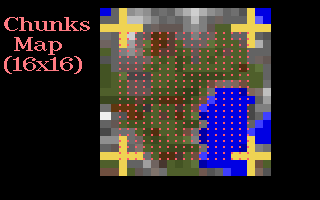
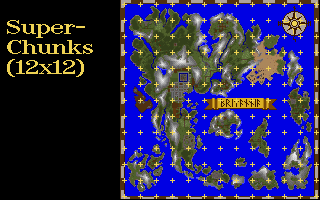
The land in Ultima 7 is neatly segmented into 144 (12x12) sections. U7MAP is segmented into 144 512-byte "SuperChunks", and correspondingly, there are 144 U7IFIX??'sand 144 U7IREG?? files.
Most of the first story scenery is read from the U7MAP file, the only omissions are the swirling space tiles (Tetrahedron, I think), the chasm tiles in FOV (truth test area), and some misc. first story scenery (columns, monoliths, statues, or any other scenery that doesn't leave a glowing square when removed with the hack mover).
All second story scenery is read from the U7IFIX?? files, this includes second story walls and roof tiles (regular andmountain).
All objects that can be manipulated by the user (hack moving not included), and specials (eggs) are read and savedin the U7IREG?? files.
BTW, most of the information and tricks that I use are catered to Norton DE, those with PCTools or another good hexeditor shouldn't have any trouble, but I don't recommendusing Dos Debug.
I want to give special thanks to Samuel Chong who originally figured out the purpose of U7MAP and the Ifix files, which I would have missed if he hadn't pointed 'emout to me.
The U7MAP file
The U7MAP file is segmented into 144 (12x12 grid on the worldmap) 512-byte segments (conveniently, most hex editors separate data into 512-byte segments), called "SuperChunks".
The SuperChunks are further subdivided into 256 two-byte chunks (16X16 grid on each SuperChunk).
Each of the chunks is about the size of a one room house (about four inches each way).
Each SuperChunk has 16 rows of 16 two-byte chunks, after reading the 16th chunk, the program starts a new row (one row takes up two 16-byte lines in the U7MAP file).
Here's a good way to test out the U7MAP file (back up the original first):
- Load up U7MAP (in the Static dir) under your hex editor.
- Look at the first SuperChunk, at the beginning of the file, the first eight bytes: 8E 0B 00 00 00 00 37 00 represent the first four chunks at the top, left of the U7 worldmap. 8E 0B, 00 00, and 37 00 are ocean chunks.
- Change the first two bytes to D0 0A (Skara Brae ruin), the second two bytes to 24 01 (fortress chunk), the third set to B7 00 (dungeon chunk), and the fourth set to 8B 00 (forest chunk).
The first eight bytes should now read: D0 0A 24 01 B7 00 8B 00 - Save the file and reload the game. F3 to the top, left part to the worldmap and walk around until you see the four new additions to the scenery.
You can copy entire SuperChunks to other parts of the worldmap (with Norton DE): - Load U7MAP under your editor.
- Put the curser at the beginning byte of the SuperChunk, then pull-down the edit menu (alt-e), choose the Mark option, the use the arrow-keys (or mouse) to mark the segment.
- Alt-e again and choose the Copy option, then go to the SuperChunk that you want copy over, put the curser at the beginning of the segment, alt-e and choose the Paste option.
- Save the file and reload the game to see the results.
There are quite a few chunks, so experiment and make your own lists.
The Ifix files
The U7IFIX?? files in the Static directory contain all second story scenery (except for trees), roof chunks, and some misc. first story objects (columns, monoliths, alters, etc...).
There are 144 Ifix files (U7IFIX00-U7IFIX8F).
Each Ifix file is separated into two parts, the top half (starting at hex offset 80 and ending at offset 87F) is the pointer segment and the bottom half (offset 880->) is the data segment.
As with U7MAP SuperChunks, each Ifix file has 256 chunks (16x16 grid).
Each Ifix chunk is represented by an eight byte string in the top half, ex: 80 05 00 00 0A 00 00 00 80 05 refers to the hex offset 05 80 (in the bottom, data half) where the data for the Ifix chunk begins, 0A tells the program how many bytes it needs to read to complete the chunk (art data read from Shapes.vga).
Unfortunately, each Ifix has it's own palette of picture data, so there won't be a single Ifix chunk list. You can customize Ifix files to your specification though. All you have to do is copy data from one Ifix file and tack it on the the end of another, then write in the chunks's new starting address and length.
Creating a custom Ifix
Let's say you want to grab the second story walkway connecting the two mountain ranges to the North and East of Britain (from U7IFIX28), and transfer the Ifix chunk to the Ifix file that holds LB's castle (U7IFIX33).
- First you have to make a new Ifix file (max of around 10K).
- Find a file that's close to the size you need (2K or so, I used VGTVOL.DAT form the Static dir). Copy it under the name IFIXADD or another you can remember. Load the file under Norton DE and use the Mark and Fill options in the edit menu to change the file's contents to all 00's.
- Next, copy IFIXADD onto the end of the file you want to expand, namely U7IFIX33: COPY /B U7IFIX33+IFIXADD IFIXNEW
- Copy IFIXNEW over U7IFIX33, U7IFIX33 will now have the space you need to operate.
- Load U7IFIX28 under Norton DE, and go down to hex offset 798, you should see the string: 80 0D 00 00 48 00 00 00 (pointer to walkway's data)
- Take your curser down to hex offset 0D 80, use Norton DE's Mark option to mark the block (72 bytes(48h), 3 1/2 lines, 0D80-0DCF). Use the Copy option to capture the data.
- Switch over to U7IFIX33 (do not leave DE or you will lose the data you copied, instead press <enter> to get a directory listing) and use the Paste option to copy the data to the end of the data section (at hex offset 1EE0).
- Copy down the data's new starting address (1EE0) and the size (48h).
- You can now access the transferred chunk by filling one of the eight-byte chunk slots in the top half of the file (I chose the slot at hex offset 230), in the chunk slot format: E0 1E 00 00 48 00 00 00
- That's it, reload the game, the walkway should appear just above the top, left hand corner of the road surrounding LB's castle.
The Ireg files
The U7IREG?? files in the Gamedat directory are where the game stores all objects that can be manipulated by the user (weapons, magic carpets, doors, eggs, etc...)
The data is separated into two groups, object data and specials data.
Object data is stored in a six byte format:
06 2E A7 AE 02 09 00 (Magic leg armor)
|  |  |  |  |  |  |-> Number of charges
|  |  |  |  |  |-> Spam Modifier, change to a 1, 11 or 31 to
|  |  |  |  |       make item created with the "Create item"
|  |  |  |  |       command in the Debug Menu permanent.
|  |  |  |__|-> Item number (in hex)
|  |__|-> X, Y coordinates
|-> String size indicater
Specials data (eggs & stats) are stored in a twelve byte format:
 0C 12 06 13 01 71 64 04 00 00 75 03
 |  |-> I don't have my "egg/usecode" notes in front of me
 |       right now, but will post 'em if you need 'em.
 |-> String size indicater.
***Note, if you change an item that is on-screen when you saved your game, you'll also have to change data in the U7IBUF.DAT file.
- Do an F9 (identify item) on the object, and look at the referent statement, this gives the hex offset of the item in the U7IBUF.DAT file.
- Open the U7IBUF.DAT file and go to the hex offset given by the F9 statement, you should see an eight byte string like this:
38 00 2E A7 AE 02 09 08
|  |  |  |  |__|-> Spam modifier
|  |  |__|-> Item number (Magic leg armor)
|__|-> X, Y coordinates
- The general rule here is to make changes identical to those you made in the Ireg file.
One of the problems with altering Ireg and U7IBUF.DAT object strings is finding the right spam modifier, since each class of objects has it's own (weapons, tools, secret doors, etc...).
Happily, there is a simple way around all this (you don't even to edit the files, hehe), all you have to do is duplicate the contents of the Ireg files:
- Make a backup copy of U7IREG00 (make sure you leave off the "U7" or the game will try to load the backup file), and ATTRIB +R it (read only).
- Go back into the game and place all the objects that you want to duplicate in front of LB's castle (this includes eggs and magic carpets<g>), save 'n quit.
- Copy U7IREG33 over U7IREG00.
- Load up the game, F3 to the top, left corner of the map, all the objects you dropped by LB's castle will be sitting there for the taking (magic carpets included<g>).
- Once you're through, copy the backup of U7IREG00 over the altered one.
That's it, total, wholesale plundering of anything you could ever want. Don't you feel evil<g>?
Troy Forrest
tforrestNO_SPAM_REMOVE_MAIL_junkmail@starbase.neosoft.com
stdjmf0NO_SPAM_REMOVE_MAIL_junkmail2@shsu.edu