
Nokia N95 8GB Problems Issues and Annoyances
Version 1.007
I purchased the N95 8GB on mid November 2007 from a mobile service provider. It was a big jump from a N-Gage to a 3rd edition Symbian phone.
Needless to say, I was impressed with its array of features. SMS search! GPS! Dual paging! 5 Megapixel Camera! 3.5mm socket! I can go on and on.
As the saying goes, there is no perfect phone. Here are some annoying issues I have come across on using this phone so far.
In no particular order,
01 |
To rotate the screen, you need to open up the multimedia controlsThis can be resolved with RotateMe. It even rotates your screen when you turn the phone! UPDATE: The latest N95 8GB v20.0.016 firmware resolves this by presenting a auto rotate option in Tools > Settings > General > Personalisation > Display > Rotate screen. But this doesn't allow rotation 270 degrees which RotateMe allows |
02 |
Cannot add MIDI files to Music Player's playlistRefreshing the playlist in the music player only adds MP3/AAC/WMA files. MIDI files have to be converted to one of the three formats, taking up to 200x the space! I have heard that this can be solved with a 3rd party software, CorePlayer, which is not free :( |
03 |
GPS can't be used in landscape mode with the numeric pad openBut this can be resolved with RotateMe. It even rotates your screen when you turn the phone! UPDATE: The latest N95 8GB v20.0.016 firmware resolves this by presenting a auto rotate option in Tools > Settings > General > Personalisation > Display > Rotate screen. |
04 |
Multimedia keys can't be used as gaming keys
The play button fires the Music Player application. The other keys are only used when the music player is running. Perhaps that is why no application is able to use them. Nokia must have meant the keys to be used anytime, even when gaming, to control the music. Nokia, set it as an option! The first option should dedicate these keys to music player as it is now. The second option should only use the music keys when the music player is on focus. If those keys can be used for gaming, it can bring a whole new area of landscape gaming. Although I have to admit, the buttons are quite hard to press. A tradeoff for an all-in-one device. UPDATE: The original N95 supports using the multimedia keys as gaming keys in n-gage games! Source |
05 |
Only one way Landscape modeThe phone can only switch to landscape in one way, and not the other way around. If the multimedia keys can be used for gaming, this will provide a much better gaming mode. UPDATE: The beta version of RotateMe (available only to donors) allows opposite rotation, but the keys do not work properly in some applications. |
06 |
Clock screen saver is too small
Personally, I use CClock, which is shown on the right. It is free as well. Download it here. |
07 |
Battery bar behaves like a DB measureOn the first day, with normal use, it will show 5 bars. On the 2nd day, with about the same use, it quickly drops to 2 bars by the end of the day. Why isn't it consistent? The battery bar should be a measure of how much power is left. But this may be something personal as other people call it as a battery strength meter. |
08 |
Camera sound can't be switched off in some regions
Fortunately, there is a 3rd party utility that allows this. It is called CCamera and can be downloaded here. However, it is not as good as the built-in camera app as it does not seem to utilise the N95's anti-shake mechanism. |
09 |
Can't reduce brightness of screen further to save batteryThe minimum screen brightness is still too bright, especially when used at night. If only Nokia provided screen levels darker than the current minimum, it can save more battery power. Yes, you can reduce the brightness in the Settings, but the point of this post is that the minimum setting is still too bright. This same issue exists with my Dell XPS M1210 laptop. Or for my Philips 22" LCD monitor as well. The minimum brightness is still too bright. |
10 |
Can't switch off keypad lights permanently to save batteryAll of the places I go has enough light. Even if there's no light, I can feel the keys as I am already used to them. Another sure-fire way to save battery, but Nokia does not provide the option. |
11 |
Light sensor can't be disabled to save batteryIronic. To save battery power, a light sensor that consumes additional battery power is installed. And it is only used for the keypad lights. It can't be used to adjust LCD brightness automatically. |
12 |
Call Recorder function beeps every 10 second.Privacy laws again. Fortunately, there are workarounds. An example is Total Recall. It performs effective beep free call recordings in AMR and WAV formats. |
13 |
Can't move folders to other folders in menu system
When you select an item, there is a option to "Move to Folder". When you select a folder, that option is not there. |
14 |
No way to control Java applications' audio volumeAnd if the game selects to play the music at loud volume, there is only way way to end it - hit the red button. Java games do not follow the volume of the ring tone so even if you have set it to Silent mode with Warning tones On, the game can blast at max volume. |
15 |
Switching off Warning Tones switches off Java sounds as wellPerhaps Nokia wanted to provide a one-off switch to turn off java sounds. Why can't they provide a general volume controller setting like "Java Sound Volume". Better still, java sounds should follow the same volume as the ring tone volume. More better still, there should be an option for the user to choose which way java volume should be controlled by. |
16 |
Web browser has its quirks
You cannot go 'forward' and the browser does not work properly with many sites that depend on the user agent. Otherwise, it is a great browser that provides many options such as increasing text size and disabling JavaScript. |
17 |
When selecting a ring tone, it shows every single MP3 in the flash memory
There is again, no search. Fortunately, there is a workaround. The Gallery. Locate the song in the Gallery and use the menu option "Set As Ringtone". |
18 |
When selecting a SMS tone, you are forced to scroll through a long list of mp3 files
There is absolutely no search function. You are forced to scan through the entire list if the tone you want is in the middle. A workaround is to change the first letter of the file to start with the letter 'M'. This will place the file among the Message tones as the list is sorted alphetically. |
19 |
Odd Restarts, Freezes, Hangs every once in a while (does not happen with v20 firmware)Incidents which have caused the phone to stall in various ways
It does not always happen - but the point here is that it does happen. At the least expected moments. Imagine, you are in a overseas call, you plug in the ear piece and... WSOD! (White Screen of Death). UPDATE 11 JANUARY 2013: Yes folks, I am still using this phone! However, recently it started to restart once every five minutes, sometimes continously. I have tried many things such as clearing web cache, messages, images, chkdsking the flash drive but no use. Finally, I changed the battery to the one that originally came with the phone and the phone appears to work great now. Hope it helps someone! |
20 |
No easy way to view the full name of a file in File Manager
The expected behavior is for the row to scroll horizontally so that the user does not have to do two presses to view the full file name. This is a problem with all my long named mp3 files. |
21 |
Cannot Record Radio
My classic N-Gage had this. Furthermore, in high quality AAC format. And almost all other portable mp3 players come with this basic function. Why does the N95 not have this? |
22 |
Music Player Volume is SoftThere is either some hard coded limitation in the volume or the N95 music hardware just sucks. My old N-Gage Classic beats the volume level output anytime. So does my brother's cheapo flash MP3 player. Most of the time, I am listening to my music at 100% volume. With my previous N-Gage, it is normally at 8/10. Has nokia locked the volume of the device? Like the iPod? A workaround for this is to enhance the music files volume by using the free Audacity (expect to take lots of time as you have to do it for each file). Or you can spend some money and use Musicmatch's Burner with DFX to apply sound enhancement to a MP3-DVD and copy the resultant MP3 files in the DVD to your N95. |
23 |
Can't control volume using directional padI find it very hard to press the side volume buttons. Furthermore they are disabled when the keypad is locked as the keys are not easy to press, it should not be locked along with the other keys when Keypad Lock is activated. My previous N-Gage allowed the volume to be controlled by pressing the left/right keys in the directional pad. Of course, the Music Player must be on focus. |
24 |
Balance Control is not sensitive enoughNokia has been thoughtful to have provided a balance control for the Music Player for those having unbalanced hearing issues. Unfortunately, for people like me, it just reverses the problem.
The N95 sound balance control changes the balance too much for just one notch left or one notch right. It would have been better if the balance control allows less balance change for each notch as I find that one notch shifts the balance too much. |
25 |
No Balance Control in Radio ModeFor some reason, you cannot adjust the sound balance in the radio application. Hope Nokia does something about this. |

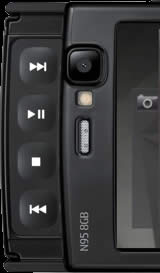 The keys are strictly multimedia. No application is able to bind it for its own use.
 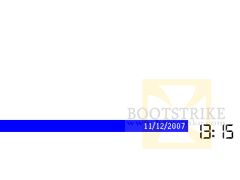 I am not sure why the clock has to be so small when the phone has so much screen estate.
 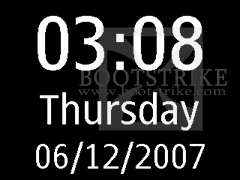 Thankfully, Symbian allows the clock screen saver to be customized.
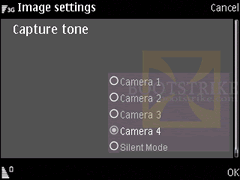 Due to 'privacy laws', Nokia did not provide an option to disable the camera shutter sound in certain regions.
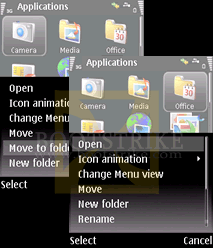 You can move items but not whole folders.
 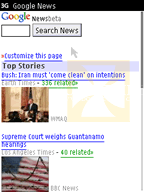 There is no way to change the user agent to a WAP browser or specify a hosts file to browse local intranet addresses.
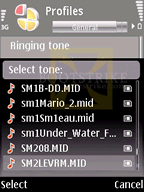 If you need to select a ring tone in the Profiles, and you have heck lots of MP3s in the flash memory, be prepared to scroll through a long list of all the audio files in your device.
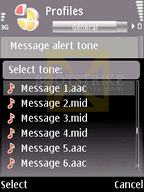 Not so for the message tones and the video ring tone.
 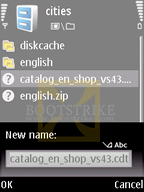 Select any file with a long name in the file list in File Manager (Tools). The only way you can view the extension and full name is to go to Rename in the Options.
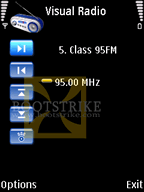 I can't see why this is left out.
 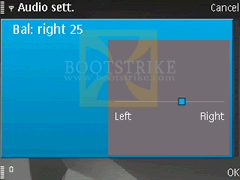 What do I mean? Say you move the notch to the right so that your right slightly hearing impaired ear can hear more. Now it becomes that the left is lacking audio and the right has too much audio.
Questions, Errors and Queries?
This document is Copyright(©) 2007-2008 by G.Ganesh. Visit Bootstrike.Com (http://bootstrike.com).
Last Updated 11 January 2013.
| new post | [ expand all ] |
49 comments
Page: Prev 1 2 3 Next Show All
Page: Prev 1 2 3 Next Show All