|
|
|
We take pride in being able to offer you a wide variety of office and home computer services. Our expert security technicians are well experienced in dealing with many computer problems as well as providing various IT Support desktop services.
Pop-up Advertisement Windows coming from nowhere
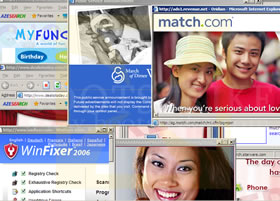
Spyware and Virus bubble alerts coming from the System Tray. Software such as System Antivirus 2008, Antivirus 2008 Pro, Ultimate Antivirus 2008, Doctor Antivirus 2008, Vista Antivirus 2008, Rapid Antivirus 2.7, UltimateFixer, XP Security Center, SpyFalcon, SpyAxe, SpySheriff, SpyQuake, BraveSentry, ErrorSafe, WinAntiSpyware 2006, SpywareLocked, SpyLocked, Spydawn, Spycrush, AntiVerminser, AntiVermins, AntiVermeans, Spysoldier, ContentEraser, Antivirus 2010, XP Antispyware 2009, PCVirusless, Spyware Guard 2008, Personal AntiSpy, Cleaner 2009, Antivirus XP 2008, Total Secure 2009 and Advanced Antivirus
Even More: Spyware Preventer, Andromeda Antivirus, Antivirus Doc, XPert Antivirus Enterprise, XPert Antivirus 2008, XPert Antivirus, MS Antivirus, XP-Guard, Antivir64, WinProtector, Internet Antivirus, Antispyware XP 2008, AntiSpyStorm 2008, PC Protection Center 2008, Power Antivirus 2009, Vitae Antivirus 2008, Antivirus Master, WinDefender 2008, Wista Antivirus, System Optimizer 2008, Virus Guard Plus, eAntivirusPro, VirusResponse Lab 2009 2.1, Antivirus Lab 2009, Micro Antivirus 2009, XP Protector 2009, Advanced Privacy Suite, Advanced Privacy Guard, Spy Devastator, Smart Antivirus 2009, Anti Malware Suite, Cleaner 2009, VirtualPCGuard, AntiMalware 2009, Antivirus Protection, Security Scanner 2008, eAntiVirus Pro, Spywareknight and/or Virusburster coming out from nowhere.
Messages such as "Dangerous files found! Your Privacy is at Risk!", "WARNING! Attack Detected!" appear.
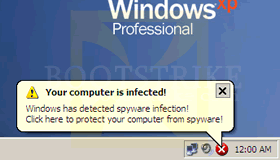
Red Cross in system tray. "Your Computer is infected" yellow triangle alerts with exclamation mark, "System Performance monitor", "System Alert". Flashing Green Man in wheelchair icon. Read more about common spyware symptoms. See a video of it in action.
Your desktop wallpaper is changed to a spyware infection warning message. Unable to change background in Display Properties Desktop due to grayed out and disabled fields.
Windows Messenger / MSN virus - "those ur pics" message infecting your PC to spread viruses to your contacts.
If you have one or more of the above symptoms, most likely your PC has spyware and adware installed. They can cause major performance hits and disrupt your normal usage. We can also install free antivirus and free antispyware software.
|
Sluggish performance/internet connection when using the computer
People informing you that you sent viruses to their mailbox and you have no idea why
Network icon on system tray indicates activity even though you have closed all running applications
Your ISP informs you that your account is sending too much mail data
You find bounced mails coming from people that you never sent any mails to before
If you have one or more of the above symptoms, your PC is most likely being used as a "Zombie", where hackers in the Internet control your PC to send spam and perform DDOS attacks on websites. Contact us to send an IT Professional to your place!
|
Install / Configure Cisco® Catalyst®, Cisco® Router, Cisco® ADSL Router
Act as a Field Engineer for your [foreign] company to provide network services for local Singapore users
Ad-Hoc Network Servicing Services
Professional service for Cisco® network upgrade and network migration
Professional services for other network devices
such as 3Com®, PlaneX®, Linksys®, D-Link®, Netgear®, Buffalo® and Aruba®
Network Migration, Network Relocation
Setup office/corporate network
Setup office/corporate wireless network
Network Cabling wiring works
Network Benchmarking
|
The page cannot be displayed
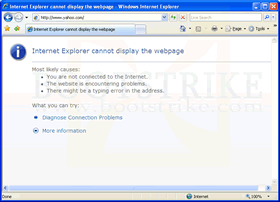
Limited Or No Connectivity
Slow BitTorrent download speeds, P2P speeds
Cannot access Internet, DBS Internet Banking, CPF IRAS SingPass problems
Port Forwarding for Bittorrent / utorrent / Azureus / Vuze, Port Mapping, Enable router DMZ mode
Securing/Encrypting Wireless Network against outside users
|
Documents, photos, music
Microsoft Outlook / Outlook Express e-mails
iTunes music including paid-for music and ripped music
Save games from games
Favorites, bookmarks
|
Setup a personal website with hosting, domain and e-mail with DreamHost
Setup a blog, forum or e-commerce site with no HTML or technical knowledge required
Register / Reserve a web domain name with any TLD
Setup e-mail accounts at domain name
Forward e-mails from one e-mail address to another e-mail address
|
Computer is running but no display
Computer does not turn on when power button is pressed
Display comes until loading screen, then blacks out
Beeping sounds when switching on computer with blank display
|
Damaged Partition Table (can't see drive)
Unable to recover data even when mounted in an external enclosure
Safe Mode / Last Known Configuration fails to get into desktop to be able to backup data
Hard disk fails to spin or power up on boot up
USB flash drive not detected
|
Desktop resolution stuck at 640 x 480 (large big sized windows)
No sound coming from speakers
Can't play any 3D games, DirectX errors
"The system DLL user32.dll was relocated in memory. The application will not run properly..."
|
Windows could not start because the following file is missing or corrupt: <Windows root>\system32\hal.dll
Operating System not found, Insert System Disk to continue
Windows could not start because the following file is missing or corrupt:
<Windows root>\system32\ntoskrnl.exe
Primary Hard disk not found
UNMOUNTABLE_BOOT_VOLUME
Computer keeps restarting before Windows loads
|
Obtain sites visited by a password protected user / account using (Bootstrike.Com) Internet Explorer / Mozilla Firefox
Access files of a password protected user / account
Extract Internet Explorer saved passwords/form entry fields of a user / account
|
Very long to open Outlook or Outlook Express
Microsoft Outlook giving 0x80040119 or 0x80040600, Unknown Error
New games running sluggishly
Computer starts up slow
|
IE saved forgotten password in AutoComplete and need to recover it
Outlook Express Mail or news saved password forgotten, but saved in OE
Dial-Up Passwords saved, but forgotten
Windows XP CD Key Recovery
Microsoft Office CD Key Recovery
MSN/Windows Messenger Password Recovery
Wireless WEP Key Recovery
Windows XP User Account Password Recovery
|
How to backup Microsoft Outlook [Express] Emails (PST, DBX)
How to backup Address Book
How to backup Desktop Items, My Documents, Favorites, Bookmarks
|
| "You may be a victim of software counterfeiting. This copy of Windows is not genuine and is not eligible to receive all updates and product support from Microsoft." message appears even though it is genuine
Cannot delete <file>: It is being used by another person or program.
Remove title in Internet Explorer / Outlook Express - Internet Explorer provided by XXX Company
Generic Host Process for Win32 Services has encountered a problem and needs to close. We are sorry for the inconvenience.
Norton AntiVirus - "Unable to repair", "Unable to delete", "Unable to quarantine", "Access Denied", "Unable to repair the infected file"
Windows Firewall - "For your security, some settings are controlled by Group Policy"
Windows Networking - "Logon failure: the user has not been granted the requested logon type at this computer"
Keyboard keys giving incorrect letters - e.g. pressing " gives @
Hotmail / MSN / AOL / GMail refuses to login - keeps looping, "The e-mail address or password is incorrect. Please retype the e-mail address and password..." from Hotmail / Windows Live / MSN using Microsoft Internet Explorer or Mozilla Firefox.
Unable to change XP desktop wallpaper background. Background list is disabled or Desktop tab is missing in Display Properties. Screen Saver tab is missing.
Change the "Registered To" information for Windows XP without reinstalling
"Task Manager has been disabled by your administrator."
"Registry editing has been disabled by your administrator."
|
How to create Audio/Data CDs
How to send/receive e-mail using Outlook Express
How to create User Account with limited access
How to insert disclaimer footers automatically for every e-mail you send
How to maintain performance
How to clear browsing history of visited sites, cookies and recent documents
|
Rapidshare "You have reached the download limit for free-users. Would you like more?" or "Your IP address XXX.XXX.XXX.XXX is already downloading a file. Please wait until the download is completed." or "The download session has expired."
Megaupload "Download limit exceeded" and "Your IP address XXX.XXX.XXX.XXX is currently downloading a XXXXXXX byte XXX file. Please finish this download before starting another one."
|
Should I upgrade to Windows Vista?
What security measures should I take when going online?
Do-It-Yourself (DIY) or Branded computer?
Can my PC handle the latest games?
What reliable CD-R and DVD-R brands to get?
What should I know when getting a hard disk / motherboard / display card / LCD / etc?
|
We can build a DIY PC for you from $700!
DIY (Do-It-Yourself) Assembled Office Desktop, Gaming Desktop, Budget Desktop
Budget/High-End Graphics nVidia/ATI Card
Creative X-Fi Sound Cards, TV Card
Seagate/Samsung/Western Digital Hard Drive
Cosair, Kingston Memory
Monitor, Printer, Modem
Speakers, Keyboard, Mouse,
DVD Writer, CD Writer
|
Upgrade your laptop RAM
Sell Camcorder / Video8 / Hi8 / Digital8 / VHS / S-VHS player
Sell your old laptop to us! Contact us.
|
..and many other services and products. Contact us now!
|
|
 |
Did you know that branded computers are best suited for "computer idiots"?
Stick with branded (eg. Dell) PCs for the best support. DIY (Do-It-Youself) computers require too much time and computer know-how to maintain.
With branded PCs, full telephone support and onsite diagnostics are provided.
You may need to pay extra for the above warranty options.
However, the one option that branded manufacturers offer for any virus infection is to "Use the Restore Feature".
That option destroys all your personal data and resets the computer to factory state (ie. no Microsoft Office, all personal documents and installed software gone)
That's where you can call us to fix up your system without loss of data. |
|