
| print view | expand content | forums | guestbook | disable ads | Contribute / Submit |

  Home > Articles > Pioneer DVR-530H-S/DVR-630H-S Review

Pioneer DVR-530H-S/DVR-630H-S Screen Shots
Version 0.70
May Also Apply to DVR-340H-S, DVR-541H-S, DVR-640H-S (Notes)

| Review | Screen Shots | Buy It |
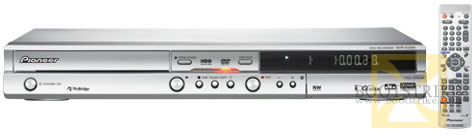
Pioneer DVR-530H-S DVD HDD Recorder

All screen shots have been scaled down in size. Watermarks are inserted to prevent stealing of the image. Hover your mouse to see the description.

Setting Up Auto Start Recording Changing TV Signal type to NTSC A Capture Screenshot of the video
You can control number of videos displayed at once The Disc Back-Up Option Starting a new Disc Backup
Prompt to start copying You can still multi-task while copying! User Friendliness (Cancelling Recording)
Forcing a cancel (everything copied is deleted) Status of Disc Backup Buring the backed up DVD to another DVD
Copying Copy Protected Content Recorded Clips (Note that only the selected clip plays) The Disc Setup Menu
Finalizing a disc Initializing a Disc (Automated usually) Optimizing (Defragging) the Hard Disk
Choosing type of video editing Peeping through a DVD's Contents Playing a DVD-RW Mp3 Fails!
Playing a DVD-RW Mp3 Fails! (2) The wealth of options for each recorded video
A Helpful Reminder to Finalize To Finalize the DVD.. Finalize DVD - Select a Menu Style
Finalize DVD: Confirmation of Menu Finalize DVD: Status Sorting and Viewing Options
Copying from HDD to DVD Copy to DVD Progress Selecting a Recording Format
Copy to DVD: You can put multiple clips in one DVD Copy to DVD: Selecting Clips to copy Copy to DVD: Auto compression if too much is selected
Copy to DVD: Other Recording Options Copy to DVD: Speeds available Copy to DVD: Final Step
The Home Menu The Home Menu (Without Video Background) Inserting a DVD-RW disc
Progress of Initializing Disc Initial Setup Basic Initial Setup Audio In
Initial Setup Audio Out Initial Setup Language Initial Setup Other Options
Initial Setup Playback Initial Setup Video In Video Out The "JukeBox"
Playing LOTR DVD Loading a CD-R with Mp3 Playing Modes of Mp3 (Nope, no Shuffle)
Allows programming of track list Attempting to play NTSC DVD while recording PAL show Attempting to play NTSC video while recording PAL show
Attempting to copy NTSC dvd to HDD with TV Mode set to PAL Attempting to copy NTSC dvd to HDD with TV Mode set to PAL Copying works after setting the TV and DVD to NTSC
User Friendliness: Copying can be interrupted Copying a Title. No control over playback. A photo loaded from a thumb drive
Option to copy photos from a camera Only digital cameras work with this feature (For informational purpose) Option to copy photos from a camera (2)
View photos on a USB Thumb Drive Photo listing in the thumb drive Link from Home Setup to access the thumb drive photos
Loading of Large photos from USB/DVD/HDD takes the same amount of time Photo Options Setting TV to NTSC format refuses to display PAL signal entirely
Track Repeat Options Setting a thumbnail for a recorded clip Disc Navigator Options
Other Sorting Options Starting a recording One-Touch Recording - A Convenient Feature
Stopping a Recording Setting Timers Options for Timer Recording
Options for Timer Recording (2) Options for Timer Recording (3) Options for Timer Recording (4)
Options for Timer Recording (5) Convenient messages throughout the interface The TV Size Option.
Play Options  

Questions, Errors and Queries?

Please post any queries you have in the Forums! No registration or login required.

This document is Copyright(©) 2001-2008 by G.Ganesh. Visit Bootstrike.Com (http://www.bootstrike.com).

Last Updated 11th June 2006.


Bookmark this page!

Privacy Policy - Terms of Use - Contact Us - Site Map
All original content (©) Copyright 1997-2008 Bootstrike.Com. 0.00386 seconds to render.